Charger8232

joined 2 years ago
[–] Charger8232@lemmy.ml 1 points 2 weeks ago (1 children)

Now, eating a meal at a restaurant or spending an extended time indoors like that would be a little out of place.

The worst that can happen is you get escorted out if the location is really stingy. As long as you can deal with social pressure (it helps that nobody will know who you are) you should be fine.

[–] Charger8232@lemmy.ml 1 points 2 weeks ago (3 children)

Especially in the wintertime or for skiing, most people won't care if you have one on. Even if they do care, it doesn't change its anonymity.

22
submitted 2 weeks ago* (last edited 2 weeks ago) by Charger8232@lemmy.ml to c/privacy@lemmy.ml
 

Happy winter and merry festivities!

Last year I made a post outlining many gift ideas for privacy enthusiasts. I'm back this year with an updated list. Privacy enthusiasts, by nature, are sometimes difficult to buy gifts for. This list is here to make it easier for you to come up with ideas, even if you don't directly gift what's on the list. I've decided to make a rule this year: only physical items. You can't put a subscription under the tree.

3D printers

3D printers can turn plastic into any shape you want. While a lot of 3D printers include proprietary privacy-invasive software, there are open-source options such as RepRap. The privacy benefit of these comes in the form of homemade firearms. Traditional firearms include many elements to trace the ammunition back to the firearm, but homemade firearms (such as ones made using a 3D printer) exclude these. The reliability of the firearm depends on the quality of the 3D printer, but the designs are getting easier and easier to make.

Accessories

Especially for phones, there are a few of privacy accessories that are simple but effective.

Anonymous dress

Anonymous dress is clothing that conceals your identity in public. Obtaining these items of clothing is a chore, so it's always easiest when it is gifted by somebody else. Black, unthemed clothing does the best job of protecting privacy. The holy grail of anonymous dress is:

  • A balaclava to hide your face.
  • A baseball cap to further hide your face, although a sun hat does a better job.
  • A hooded down jacket to hide body shape and skin color. There are significantly long down jackets that extend below the knees that can somewhat conceal your gait too. Last year I included jackets that spoof AI recognition or blind infrared cameras, but those are very difficult to find and can be very identifying.
  • Elevator shoes to conceal your height.
  • Sunglasses to hide your eyes. Reflectacles do the best job of this.
  • Touchscreen gloves to prevent fingerprints and still be able to use touchscreens. Normal gloves work when paired with a capacitive stylus.
  • An umbrella to hide your clothing from surveillance cameras.

Ciphers

Not all encryption is digital. Traditionally, complex codes and ciphers were created to conceal messages. Hardware devices like the enigma machine were used to further aide the process. Modern versions of those devices, as well as related items such as invisible ink are still around and can be a fun project.

Computers

Laptops, desktops, and servers are all useful devices for accessing digital services privately. While there is no best choice, some lists can help shine some light on which hardware is considered secure:

Concealment devices

Concealment devices are things that look like ordinary objects, but in some way or another, have a hidden compartment used for storage. These are excellent ways to hide sensitive items such as cash, backup security tokens, and more. These are excellent gifts if you're giving one-on-one rather than at a party.

Cryptocurrency wallets

Cryptocurrency wallets are devices used to securely store (the keys for) cryptocurrency such as the private cryptocurrency Monero. The two best options are:

Dumb tech

Dumb tech is the opposite of smart tech. It doesn't connect to every device in your house. It doesn't broadcast that data to a corporation. It doesn't get exposed in a data breach. It doesn't get hacked. It doesn't go down when the internet goes offline. Things like dumb TVs or dumb cars are becoming harder to find but more and more valuable for privacy.

Mail

Mail is almost always sensitive. For that reason, it's useful to protect the contents by using security envelopes. For delivering packages privately, it's also useful to have a label printer capable of printing shipping labels.

Money

Banks and payment service providers are almost always incredibly privacy invasive and offer poor security. While some of these issues can be mitigated with services like Privacy, it doesn't fix the underlying issue. Anonymous payments not only protect your privacy, but protect your money too, and having the ability to make payments like these is what allows privacy to further grow. Anonymous payment methods include:

  • Cash
  • Gift cards (when purchased with cash and adequate anonymous dress)
  • Monero (which is physical when paired with a cryptocurrency wallet)
  • Stored-value card (when purchased with cash and adequate anonymous dress)

Optical discs

Optical discs are a physical way to store movies, shows, music, games, and more. The idea is that, instead of paying a subscription and streaming content, you can pay a one-time fee and get the full quality media offline. This is also excellent for ripping to create a digital archive to stream from your own servers for free.

Paper

Your most sensitive information is put at risk the moment it becomes digitized, so pen and paper isn't so bad for some uses:

  • Earlier this year, Amazon removed the option to download and transfer ebooks. It's becoming increasingly harder to "own" an ebook, especially without using privacy-invasive software. For that reason, books are much better for privacy.
  • Calendar apps are convenient for reminders, but they often sync to cloud services or include telemetry. Physical calendars are a good way to have peace of mind knowing that your personal events are away from prying eyes and can be erased without a trace.
  • Notebooks are also useful for the same reasons as books. There are also numerous benefits to writing things down instead of typing them.

Paper shredders

Paper shredders destroy sensitive documents to prevent obtaining sensitive information by digging through landfills. However, shredded documents can be recovered using automated software. The paper shredder industry hasn't discovered fire yet, it seems.

Power cables

Most cables carry both power and data. However, that can be exploited by cleverly designing fake power stations that discreetly steal data when plugged into devices. Some cables only deliver power, without delivering data. These are incredibly useful for protecting vulnerable devices in public settings.

Printers

Printers suck. So much so that not even Framework wanted to make one. Nevertheless, a new printer called Open Printer is in the works. Until it's finished, the best option is to gift a printer that allows printing over a wired connection.

Promotional merchandise

There is no shortage of promotional merchandise for privacy. Some of my favorites include:

I also recently found products like this that serve a functional benefit of telling people you don't want to be recorded without explicitly talking to them.

Rayhunter

Rayhunter is a device created by the Electronic Frontier Foundation to detect Stingray attacks. It can be installed on supported devices, which are great gifts for high threat model people.

Safes

Safes are a secure box to store sensitive items. I shouldn't need to explain why this is a good idea.

Security seals

Security seals are a special type of sticker that makes it very clear if the seal has ever been broken. This is useful to place on the case of computers or other containers that shouldn't be opened often.

Security tokens

Security tokens are hardware devices used to authenticate accounts at a hardware level. When setup correctly, they are one of the most secure way to login. The most popular open source options are:

Smartphones

GrapheneOS is the most private and secure operating system available. They recently announced that they are partnering with an OEM to manufacture devices designed for GrapheneOS. However, until that device is made available, Google Pixels are still the only device GrapheneOS can be installed on.

USB flash drives

USB flash drives are the unsung heroes for so many areas of privacy. Whether it be installing operating systems such as Qubes OS and Tails, or creating offline Seedvault backups for GrapheneOS, USB flash drives have a multitude of uses. Just remember: it's better to have many, smaller USB flash drives than one, large USB flash drive.

Wi-Fi hotspots

Wi-Fi hotspots are (for privacy use-cases) hardware devices that allow connecting devices to the cellular network in a much more private way. The best one that supports an excellent privacy organization is the Calyx Internet Membership.

Wired headphones

Wired headphones not only provide higher quality audio output, but they also avoid the history of security issues with Bluetooth and the surveillance capitalism that comes with Bluetooth Low Energy beacons. Which type of wired headphones you gift depends on a lot of factors, but one that pairs nicely with Google Pixels are the Pixel USB-C earbuds sold by Google themselves.

Wireless routers

Wireless routers often leak everything sent through them. For that reason, custom software such as OpenWrt was designed to replace the privacy invasive software preinstalled on routers. OpenWrt also created their own router called the OpenWrt One. Earlier this year, they announced that they would be creating a new router called the OpenWrt Two. It hasn't come out yet, but maybe it will be on the list next year.

Conclusion

There is no shortage of privacy tech. The same technology that empowers privacy is the thin veil slowing down the world from its dystopian target. Giving the gift of privacy means giving the gift of a better future for those of us fighting on the front lines.

Lack-of-AI notice

I’ve been burned before, so I always try to mention that none of my content is AI generated. It isn’t even AI assisted. Just because something is comprehensive and well-structured does not make it AI generated. Every word I write is my own. Thank you for your understanding.

[–] Charger8232@lemmy.ml 1 points 3 weeks ago

I'm certain that most people between 2016 and 2023 bought multiple devices to upgrade old ones.


I wanted to share an interesting statistic with you. Approximately 1 out of every 25 people with a Google Pixel phone is running GrapheneOS right now. While it's difficult to get an exact number, we can make educated guesses to get an approximate number.

How many GrapheneOS users are there? According to an estimate released by GrapheneOS today, the number of GrapheneOS devices is approaching 400,000. This estimate is based on the number of devices that downloaded recent GrapheneOS updates. Some users may have multiple devices, such as organizations, and some users may download and flash updates externally, but it's the best estimate we have.

How many Google Pixel users are there? Despite Google's extensive data collection, this one is surprisingly harder to estimate, since Google hasn't released an exact number. There's a number floating around that Google has 4-5% of the smartphone market, which is between 10 million and 13.2 million users in the United States. I can't find the source of where this information came from. That number is problematic, too, because Japan supposedly uses more Google Pixel phones than the United States. The Pixel 9 series was also a big jump in market share for Google. I couldn't find any numbers smaller than 10 million, and it made the math nice, so that is what I went with.

Putting the numbers together, it means that 4% of Google Pixel users are running GrapheneOS. That means in a room of 25 Google Pixel users, 1 of them will be a GrapheneOS user. If you include all custom Android operating systems, that number would certainly be much, much higher.

To put it into perspective, each pixel in this image represents ~5 Google Pixel users. Each white pixel represents that those ~5 people use GrapheneOS:

Even with generous estimates to Google's market share, GrapheneOS still makes up a large portion of their users.


FreeTube wasn't loading a video, so I tried opening it in the YouTube website instead. Rather than being able to watch a 13 second video (here it is in case anyone wants to know), I managed to capture is one of the most dystopian screenshots I've personally seen. Every single element of this image is truly astounding if you look close enough and think about it for a moment.

13 seconds of your life now costs you even more time to prove you're not trying to scrape a video from a hundred billion dollar corporation with nearly infinite resources, advertisements and clickbait grabbing at your attention, every interaction logged and sold to thousands of data brokers, and you can't even show your appreciation without selling more information by creating an account. How did we get here?


Almost one year ago I made this post about how the Wikipedia page for the "Nothing to hide" argument removed the text stating that it is a logical fallacy. I advocated for it to be added back. Three days after that post it was added back.

Exactly one year, to the day, after the logical fallacy text was removed, it got removed again. On October 19th of this year, a different user removed the text from the Wikipedia page, despite plenty of evidence that the "Nothing to hide" argument is a logical fallacy.

I am back here, once again, advocating that the text be added back.

P.S. It's an absolutely crazy coincidence that the same edit happened to the same page on the same day exactly one year apart.

0
submitted 2 months ago* (last edited 2 months ago) by Charger8232@lemmy.ml to c/privacy@lemmy.ml
 

VPN Comparison

After making a post about comparing VPN providers, I received a lot of requested feedback. I've implemented most of the ideas I received.

Providers

Notes

  • I'm human. I make mistakes. I made multiple mistakes in my last post, and there may be some here. I've tried my best.
  • Pricing is sometimes weird. For example, a 1 year plan for Private Internet Access is 37.19€ first year and then auto-renews annually at 46.73€. By the way, they misspelled "annually". AirVPN has a 3 day pricing plan. For the instances when pricing is weird, I did what I felt was best on a case-by-case basis.
  • Tor is not a VPN, but there are multiple apps that allow you to use it like a VPN. They've released an official Tor VPN app for Android, and there is a verified Flatpak called Carburetor which you can use to use Tor like a VPN on secureblue (Linux). It's not unreasonable to add this to the list.
  • Some projects use different licenses for different platforms. For example, NordVPN has an open source Linux client. However, to call NordVPN open source would be like calling a meat sandwich vegan because the bread is vegan.
  • The age of a VPN isn't a good indicator of how secure it is. There could be a trustworthy VPN that's been around for 10 years but uses insecure, outdated code, and a new VPN that's been around for 10 days but uses up-to-date, modern code.
  • Some VPNs, like Surfshark VPN, operate in multiple countries. Legality may vary.
  • All of the VPNs claim a "no log" policy, but there's some I trust more than others to actually uphold that.
  • Tor is special in the port forwarding category, because it depends on what you're using port forwarding for. In some cases, Tor doesn't need port forwarding.
  • Tor technically doesn't have a WireGuard profile, but you could (probably?) create one.

Takeaways

  • If you don't mind the speed cost, Tor is a really good option to protect your IP address.
  • If you're on a budget, NymVPN, Private Internet Access, and Surfshark VPN are generally the cheapest. If you're paying month-by-month, Mullvad VPN still can't be beat.
  • If you want VPNs that go out of their way to collect as little information as possible, IVPN, Mullvad VPN, and NymVPN don't require any personal information to use. And Tor, of course.

ODS file: https://files.catbox.moe/cly0o6.ods

1
VPN Comparison (testing.crazypeople.online)
submitted 2 months ago* (last edited 2 months ago) by Charger8232@lemmy.ml to c/privacy@lemmy.ml
 

VPN Comparison

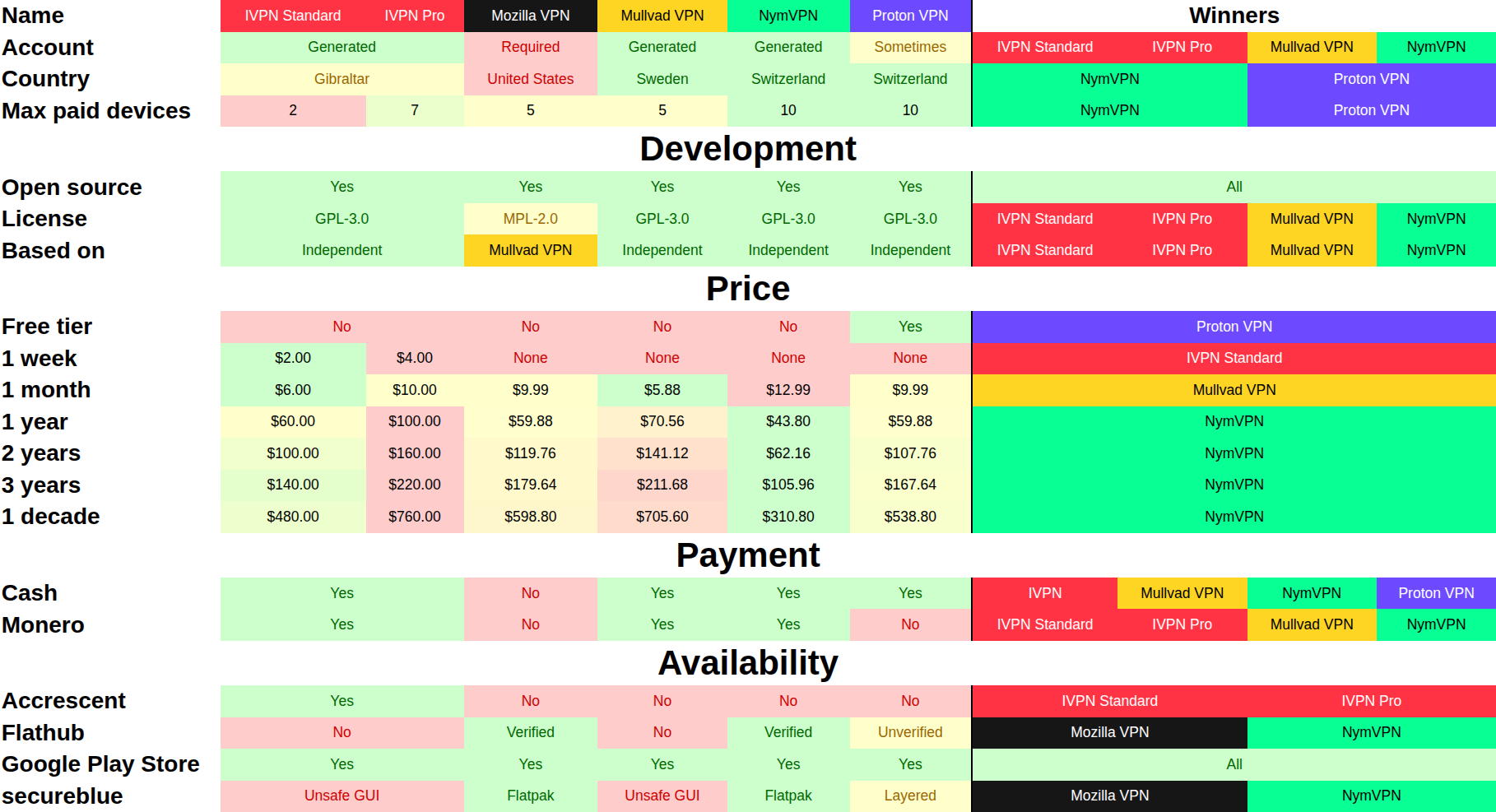
I made a spreadsheet comparing different open source VPN providers.

Part 2 here

Providers

Notes

  • Please do not start a flame war about Proton.
  • Please do not start a flame war about cryptocurrencies. Monero is the only cryptocurrency listed because of its privacy.
  • The very left column is the category for each row, the middle section is the various VPN providers, and the right section is which VPNs are the best in each category.
  • IVPN has two differing plans, which is why "Standard" and "Pro" are sometimes differentiated.
  • For accounts, "Generated" means a random identifier is created for you to act as your account, "Required" means you must sign up yourself. Proton VPN allows guest use under specific conditions (e.g. installed from the Google Play Store), but otherwise requires an account.
  • Switzerland is seen as more private than Sweden. Gibraltar is seen as privacy neutral.
  • All prices are in United States Dollars. Tax is not included.
  • Pricing is based on the price combination to achieve the exact time frame. For example, Proton VPN does not have a 3 year plan but you can achieve 3 years by combining a 2 year plan with a 1 year plan.
  • The availability section is security based. Availability is framed around a GrapheneOS and secureblue setup.
  • The Proton VPN Flatpak is unofficial, but based on the official code.
  • Availability on secureblue is based on the ujust install-vpn command. Security features must be disabled on secureblue in order to use the GUI for IVPN and Mullvad VPN, but not for Proton VPN. Mozilla VPN and NymVPN are available as Flatpaks, which are safer than layering packages.
  • I wanted to include more categories, such as which programming languages they are written in, connection speed, and security, but that became far too difficult and complex, so I decided to omit those categories.

Takeaways

  • NymVPN is very very new, but it's off to a strong start. It wins in almost every category. I actually hadn't heard of it until I started this project.
  • If you want a free VPN, Proton VPN is the only one here that meets that requirement.
  • If you want to pay week-by-week, IVPN is the only one that allows that.
  • If you're paying month-by-month on a budget, Mullvad VPN is the cheapest option.
  • NymVPN is the cheapest plan for anything past 1 month.
  • If you want to use Accrescent as your main app store, IVPN is the only VPN available there for now.
  • If you want to pay for a bundle of apps, including a VPN, Proton sells more than just a VPN.
  • Mozilla VPN is terrible. The only thing it has going for it is a verified Flatpak, but NymVPN also has that so it doesn't even matter.
 

I know there are plenty of software missing from here. This is just a fun infographic I made, no need to take it seriously :)


The Privacy Iceberg

This is original content. AI was not used anywhere except for the bottom right image, simply because I could not find one similar enough to what I needed. This took around 6 hours to make.

Transcription (for the visually impaired)

(I tried my best)

The background is an iceberg with 6 levels, denoting 6 different levels of privacy.

The tip of the iceberg is titled "The Brainwashed" with a quote beside it that says "I have nothing to hide". The logos depicted in this section are:

The surface section of the iceberg is titled "As seen on TV" with a quote beside it that says "This video is sponsored by...". The logos depicted in this section are:

An underwater section of the iceberg is titled "The Beginner" with a quote beside it that says "I don't like hackers and spying". The logos depicted in this section are:

A lower section of the iceberg is titled "The Privacy Enthusiast" with a quote beside it that says "I have nothing I want to show". The logos depicted in this section are:

An even lower section of the iceberg is titled "The Privacy Activist" with a quote beside it that says "Privacy is a human right". The logos depicted in this section are:

The lowest portion of the iceberg is titled "The Ghost". There is a quote beside it that has been intentionally redacted. The images depicted in this section are:

  • A cancel sign over a mobile phone, symbolizing "no electronics"
  • An illustration of a log cabin, symbolizing "living in a log cabin in the woods"
  • A picture of gold bars, symbolizing "paying only in gold"
  • A picture of a death certificate, symbolizing "faking your own death"
  • An AI generated picture of a person wearing a black hoodie, a baseball cap, a face mask, and reflective sunglasses, symbolizing "hiding ones identity in public"

End of transcription.


All of us have made privacy mistakes at some point in our privacy journeys. In an effort to help those earlier on in that journey, please share some of the mistakes you've made, and how you could have prevented it.

1
submitted 1 year ago* (last edited 1 year ago) by Charger8232@lemmy.ml to c/privacy@lemmy.ml
 

Happy Christmas and Merry Hanuka!

If you're struggling to find something to buy your privacy enthusiast friend for the holidays, I have some gift ideas. As with any gift, not everyone will need these, but it can give you a good idea of what to look for. Feel free to submit your own suggestions, as well!

No affiliate links, no sponsors, no favorites. All prices are in USD. If a price is something like "$X.99" or "$X.49" or "$X39" I have rounded it up by one digit.


Subscriptions

Some privacy tools come at a cost, and not all open source software can be used for free!


Addy.io

Addy.io is an email aliasing service.

Pricing

Lite: $1 / month

Pro: $3 / month


Bitwarden

Bitwarden is a cloud-synced password manager.

Pricing

Personal Premium: $10 / year

Personal Families: $40 / year

Business Teams: $48 / user / year

Business Enterprise: $72 / user / year


Calyx Institute Internet Membership

The Calyx Institute Internet Membership provides you with a privacy respecting cellular hotspot.

Pricing

Contributor Yearly: $500 / year for first year, $400 / year thereafter

Contributor Quarterly: $150 / 3 months

Contributor Plus: $600 / year for first year, $500 / year thereafter

Sustainer Yearly: $750 / year for first year, $500 / year thereafter

Sustainer Quarterly: $175 / 3 months


JMP

JMP is an open source phone number provider.

Pricing

Plan (USD): $5 / month + additional usage costs


Mullvad VPN

Mullvad VPN is a virtual private network.

Pricing

1 month: $5.28 / month

Physical vouchers are also available through resellers.


MySudo (PROPRIETARY)

MySudo is a proprietary aliasing software. I could not find any open source option for aliasing phone numbers, especially this cheap.

Pricing

SudoGo: $1 / month or $10 / year

SudoPro: $5 / month or $50 / year

SudoMax: $15 / month or $150 / year


Privacy.com (PROPRIETARY)

Privacy.com is a proprietary financial transaction masking and aliasing tool. There are other options such as Revolut (open source), but Privacy.com seems to be the one that works best in the United States. Consider your threat model while using these tools.

Pricing

Plus: $5 / month

Pro: $10 / month

Premium: $25 / month


Proton

Proton is a software suite that includes email, VPN, cloud storage, password manager, calendar, and wallet. Their pricing is extremely convoluted and difficult to navigate.

Pricing

Proton Unlimited 1 month: $13 / month

Proton Unlimited 12 months: $10 / month

Proton Duo: $15 / month

Proton Family: $24 / month

Mail Plus 1 month: $5 / month

Mail Plus 12 months: $4 / month

Drive Plus Monthly: $5 / month

Drive Plus Yearly: $4 / month

Proton VPN Plus 1-month plan: $10 / month

Proton VPN Plus 1-year plan: $5 / month

Proton VPN Plus 2-year plan: $4.50 / month

Pass Plus Monthly: $5 / month

Pass Plus Yearly: $3 / month

Proton Business Suite Monthly: $15 / user / month

Proton Business Suite Yearly: $13 / user / month

Mail Essentials Monthly: $8 / user / month

Mail Essentials Yearly: $7 / user / month

Mail Professional Monthly: $11 / user / month

Mail Professional Yearly: $10 / user / month

VPN Essentials Monthly: $9 / user / month

VPN Essentials Yearly: $7 / user / month

VPN Professional Monthly: $12 / user / month

VPN Professional Yearly: $10 / user / month

Pass Essentials Monthly: $5 / user / month

Pass Essentials Yearly: $2 / user / month

Pass Professional Monthly: $7 / user / month

Pass Professional Yearly: $3 / user / month

Drive Professional Monthly: $10 / user / month

Drive Professional Yearly: $6 / user / month


Hardware

Not everything is digital. Hardware is the foundation for privacy, after all!


Dumb Television

Smart TVs are so last century... and this century... and the next century... Enjoy the luxury of buying a "dumb TV" while it lasts, because your TV doesn't need to spy on you! There's no best option here. You might need to purchase a large monitor instead of a TV.


Google Pixel

Google Pixel phones are one of the most secure devices, especially when you run a security/privacy focused custom Android distribution such as GrapheneOS. Other phones exist for this category, but the Google Pixel is a good baseline. Prices here are based on what are actively being sold on Google's own website.

Some things to look out for when installing a custom Android distribution:

  • Make sure the custom Android distribution you want to install supports being installed on the device you get. GrapheneOS, for example, only supports Google devices.
  • Make sure the device you purchase allows unlocking the bootloader.
  • Make sure the custom Android distribution you want to install supports locking the bootloader after installation for the device you get. Some devices do not allow relocking the bootloader, and in some cases this can brick the device. Google Pixels generally have the best support for this.
  • Make sure the device you purchase is carrier unlocked or the carrier allows OEM unlocking/bootloader unlocking. Some carriers (most notoriously Verizon) will disable this functionality to maintain a monopoly and will refuse to lift the restriction. Second hand sellers are often unaware of this and will mistakenly list the device as "carrier unlocked" when it is in fact not.

Pricing

Refurbished Pixel 6 128GB: $340

Refurbished Pixel 6 256GB: $390

Refurbished Pixel 6 Pro 128GB: $540

Refurbished Pixel 6a: $250

Refurbished Pixel 7 128GB: $430

Refurbished Pixel 7 256GB: $480

Refurbished Pixel 7 Pro 128GB: $630

Refurbished Pixel 7 Pro 256GB: $680

Refurbished Pixel 7 Pro 512GB: $780

Pixel 7a: $500

Pixel 8 128GB: $700

Pixel 8 256GB: $760

Pixel 8 Pro 128GB: $1,000

Pixel 8 Pro 256GB: $1,060

Pixel 8 Pro 512GB: $1,180

Pixel 8 Pro 1TB: $1,400

Pixel 8a 128GB: $400

Pixel 8a 256GB: $460

Pixel 9 128GB: $650

Pixel 9 256GB: $750

Pixel 9 Pro 128GB: $850

Pixel 9 Pro 256GB: $950

Pixel 9 Pro 512GB: $1,070

Pixel 9 Pro 1TB: $1,300

Pixel 9 Pro XL 128GB: $950

Pixel 9 Pro XL 256GB: $1,050

Pixel 9 Pro XL 512GB: $1,170

Pixel 9 Pro XL 1TB: $1,400

Pixel 9 Pro Fold 256GB: $1,500

Pixel 9 Pro Fold 512GB: $1,620


OpenWrt One

OpenWrt One is the first router designed specifically to run OpenWrt. It's not the only supported device, and there are other open source router firmware projects, but this is a good out-of-the-box choice.

Pricing

This can currently only be purchased from unofficial resellers for $90.


Qubes OS certified hardware

Qubes OS is likely the most hardened Linux distro available. They have their own list of certified hardware that comes with Qubes OS preinstalled. Those devices aren't the only ones capable of running Qubes OS. You can also check out the Hardware compatibility list and Community-recommended computers. These computers can run more than just Qubes OS, but if it's good enough to be certified by them, it will likely run anything else just as securely!

Pricing

NitroPad V56: Lowest $1,565.58

NovaCustom V56 Series 16.0 inch coreboot laptop: Lowest $1,256.40

NitroPC Pro 2: Lowest $1,614.73

Star Labs StarBook: Lowest $863.00

NitroPC Pro: Lowest $1,614.91

NovaCustom NV41 Series Lowest $930.60

Dasharo FidelisGuard Z690: Lowest $994.28

NitroPad T430: Lowest $737.79

NitroPad X230: Lowest $737.79

Insurgo PrivacyBeast X230: $1,341.46


Raspberry Pi

Raspberry Pis are miniature computers that are very useful for setting up proxy servers.

Pricing

There's endless configurations, but the most recent Raspberry Pi model is the Raspberry Pi 5. There are multiple resellers of this, and the cheapest one is the $50 Raspberry Pi 5 2GB


Self-hosting hardware

A privacy enthusiast's best tool is being able to self-host certain things. There is no single device to self-host, but some ideas are:

  • A server rack for general self-hosting
  • A powerful GPU for self-hosting AI
  • A self-hosted home automation kit

Hardware Accessories

What is a piece of hardware without a few accessories? Modularity is always a benefit of modern technology.


Camera covers

From laptops to webcams to phones, cameras are everywhere. If you don't fully trust the device you use and want some peace of mind, having an accessory to obscure the lenses of your cameras is a good thing to have. There are lots of options here depending on which camera you want to cover. Some phone cases even offer a sliding camera cover.


CD/DVD/Blue-ray drives

Some CD/DVD/Blue-ray drives can allow you to preserve the physical DVDs that you have bought and paid for, that may soon be end-of-life. These devices allow you to read the contents of the disk, and save a digital copy of it for archival purposes. There is no best-option here, so look around to find one that fits.


Data storage devices

Data storage devices are useful for many things such as backups, installing operating systems, booting live operating systems, data transfer, and more. The market here is huge and convoluted, so learn about different types of drives, different connectors, different connector versions (such as USB), etc. before making an educated decision.


Hardware security keys

Hardware security keys allow your accounts to be locked with a physical form of multi-factor authentication. Many organizations sell these, and some of them even provide open source hardware/software. Here are a few common brands:


Microphone blocker

Microphone blockers come in all shapes and sizes, but they all serve the same function: making sure your microphone is not able to hear anything. The effectiveness of some of these are debatable, given that most phones have multiple microphones, but it can be a fun gift nonetheless.


Privacy screen protector

Privacy screen protectors are films that you apply over your screens to restrict viewing angles. This means that if someone were to look at your phone while standing next to you, they likely wouldn't be able to see what you're doing. These screen protectors are also available for laptops, smart watches, and other screens.

When buying these, make sure of the following:

  • The screen protector supports fingerprint unlock for relevant devices.
  • The screen protector actually works well.
  • The screen protector will actually protect the device as a screen protector.
  • The screen protector fits correctly for the device you're getting.
  • The cameras will still work after the screen protector is applied to relevant devices.

Wired headphones

Bluetooth can pose a privacy risk, and that is especially true when you need to play sensitive audio. One time I was in a hallway with my Bluetooth earbuds in, connected to my phone but not playing anything, when suddenly I heard a grainy piano song. My phone wasn't playing anything, and eventually the music just cut out. To this day I have no idea how it happened, but it does mean you should be careful with wireless headphones.

Wires can be annoying, but being able to fully turn off Bluetooth can give you peace of mind knowing that your audio stays inside the wire. Having high quality wired headphones can be a blessing, and even provide a better listening experience. It's worth looking at many brands, but Google still sells USB-C wired earphones and headphones from a few different brands. Here are a few:

Google Pixel USB-C™ earbuds: $30

AIAIAI Pipe 2.0 USB-C Earphones: $40

AIAIAI Tracks 2.0 Headphones: $60


Currency

Anonymous payments are growing more and more difficult, so if you aren't sure what to buy, these are well appreciated options.


Cash

Cash is one of the most anonymous methods of payment, and can be a privacy enthusiast's gold. Multiple small bills ($1, $5, etc.) are appreciated more than a few large bills ($20, $50, etc.) because many places do not accept cash in large bills. You can also gift some rare or interesting cash, such as $2 bills, half dollars, silver dollars, dollar coins, etc.


Cryptocurrency

Getting cryptocurrency, especially anonymously, can be a long and painful process. If you are comfortable setting it up, this is a huge time saver and a great gift. Monero is generally considered the most private cryptocurrency, so that's a better choice than other cryptocurrencies. However, Bitcoin is the most popular and most widely accepted, even though it isn't very private. Try to obtain these through anonymous means such as using cash at cryptocurrency ATMs that may be in your city.


Prepaid cards

There's usually no option to pay in cash online, but there are ways around this. If you buy gift cards or prepaid VISA cards with cash, it can be almost as anonymous as cash itself. Some good choices may include:

  • Amazon Gift Cards: Amazon is very hard to use privately, but this can help significantly.

  • Google Play Gift Cards: Google Play is one of the most secure ways of installing apps, but not all of them are free. Google Play gift cards can allow you to pay for apps anonymously, so you can maintain your security.

  • Visa Prepaid Card: This is a catch-all solution for when there's no specific gift card available.


Physical Items

As with hardware, not everything needs to be digital. There are plenty of items that are cheaper and good for almost anyone.


Books

eBooks are a marvel, but they come with complications. Sometimes the formatting isn't right, sometimes you can't get them anonymously, and you need a device to even view it. If the digital apocalypse ever happens, the only way to access information will be through books. No ads, no eye strain. A good privacy related book you could buy is Michael Bazzell's Extreme Privacy: What It Takes to Disappear


Calendar

Digital calendars can be convenient, but not always safe. Anything digital can risk being remotely accessed or spied on. Having a physical calendar means you can have the benefits of a calendar, without the need for a digital device. Plus, it comes with pictures that you get to pick.


DVDs

Best paired with a DVD ripper, having physical copies of movies and games means no company can take it away from you with the push of a button. You have no ads, use no internet, no subscriptions, and have full quality.


Faraday bags

Faraday bags and pouches are containers for your devices that block all incoming and outgoing signals. That means anything that goes inside of it will have no Wi-Fi, Bluetooth, cellular, NFC, etc. This is useful if you want to make sure your device isn't phoning home. This is an item that you may want to spend extra on, because lower quality ones can still leak radio signals.


Merchandise

Privacy themed merchandise can be a good way to show that you care about privacy and to help spread it. You can find privacy merch anywhere, but NBTV (a privacy YouTuber) has a good selection of products: https://shop.nbtv.media/en-usd/

Monerochan my beloved


Notebooks

Having everything in a digital notes app can be nice or convenient, but I much prefer to write a lot of things down in a physical notebook. From diaries to sketches, it's nice to take a break from your digital life to jot down some ideas, privately.


Paper shredder

When you have sensitive documents that you need discarded, one of the best ways is a paper shredder. If you buy one of these, the best ones are ones that dice the paper or burn it entirely. Even those small squares can be pieced together again.


Safes and lockboxes

Speaking of sensitive documents, where do you store those? A good place to store sensitive documents is in a safe or a lockbox. From government documents to your best ideas, they deserve to stay (in a) safe. It's good to make sure you buy a fireproof safe, just in case Fahrenheit 451 becomes more of a reality.


Surveillance camera jackets

As the looming threat of widespread AI surveillance comes closer, defenses against them grow stronger. Generally, you have two options:

These can be expensive and hard to find, but the best way to fight surveillance.


Ending notes

Thank you all for reading this! I hope it helps you find a gift for a privacy enthusiast you can't think of a gift idea for. You don't have to buy the exact things listed here, but it gives you a general outline with ideas. I know there are some great gift ideas I missed here, so please leave them in the comments to help out others!

Merry Christmas, Happy Hanuka, and have a nice day!

- The 8232 Project