
this post was submitted on 16 Dec 2025
5 points (100.0% liked)

No Stupid Questions

3515 readers
139 users here now

There is no such thing as a Stupid Question!

Don't be embarrassed of your curiosity; everyone has questions that they may feel uncomfortable asking certain people, so this place gives you a nice area not to be judged about asking it. Everyone here is willing to help.


Reminder that the rules for lemmy.ca still apply!


Thanks for reading all of this, even if you didn't read all of this, and your eye started somewhere else, have a watermelon slice 🍉.


founded 3 years ago
MODERATORS
top 8 comments
sorted by: hot top controversial new old
[–] lvxferre@mander.xyz 2 points 10 hours ago

Is that initial zero a typo? I'm asking that because #0F0000 is practically black; by "dark red" people typically refer to colours around #7F0000, with a seven.

Either way, see picture:
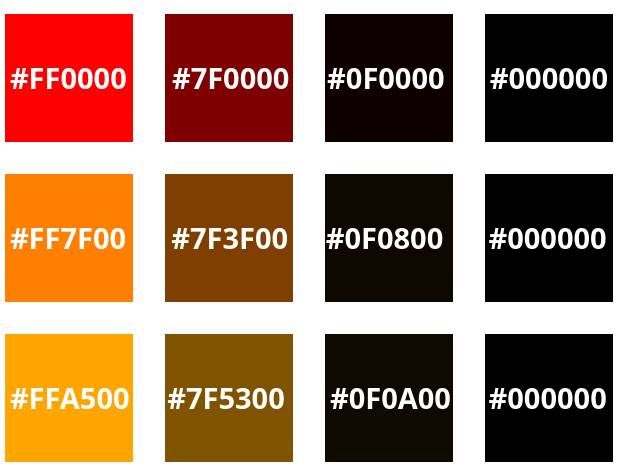
The colours in the second and third columns are 1/2 and 1/16 the value of the first. The fourth column is black for comparison. This was done by linear equivalence, not perceptual equivalence, so the oranges will look a bit brighter than the red.

I've included two oranges there; middle row is what I learned to be orange (1 part red, 1 part yellow), and bottom row is what CSS calls orange (1 part red, 1.8 parts yellow).

[–] berdandy@lemmy.ca 6 points 1 day ago* (last edited 1 day ago) (2 children)

"Pure Orange" is generally:

  • red: 100%
  • green: 50%
  • blue: 0%

So a linear equivalent in hex to that extremely dark red would be: #0F0800

However, perceptual colour rules are rarely so simple. The correct way for any colour would be to do a mathematical transformation to HSV, make the hue shift from 0° (red) to 30° (orange), and transform it back. Surprise, you get the same value.

[–] hikaru755@lemmy.world 2 points 1 day ago* (last edited 1 day ago)

If you want perceptual accuracy, HSV won't do anything for you, under the hood it still operates in the same RGB space so any math you do in it won't be perceptually linear. You'll want to transform into a perceptually based color space like OKLCH first.

The dark red in question, #0f0000, corresponds to oklch(0.1058 0.0434 29.23), in which 29.23 is the hue component that we need to change to get from red to orange. Pure orange (#ffa500) is oklch(0.7927 0.171 70.67), so we can take the 70.67 from that and plug it into the dark red value to get oklch(0.1058 0.0434 70.67). That would be the orange that has perceptually the same* brightness and saturation as the dark red. Unfortunately, that color is so dark and saturated that current displays can't show it. The closest color to it in the RGB space would be #0c0200 which is only half as saturated, but that's the closest you're gonna get.

Here's a super cool online tool that let's you play around in the OKLCH color space with nice visualizations: https://oklch.com/#0.1058,0.0434,70.67,100

* color perception is really difficult, and there are several perceptual color spaces that will all give you slightly different "proper" results, but all of them are vastly better than just using RGB/HSV.

[–] cheese_greater@lemmy.world 1 points 1 day ago* (last edited 1 day ago)

Thanks partner. My app says its "Nero", its perfect

[–] calliope@retrolemmy.com 2 points 1 day ago

CSS/HTML has an “orange” color label, which is #FFA500.

Another option is to look at color standards and get hex codes from that. Pantone has an “Orange,” for example.

[–] SethranKada@lemmy.ca 2 points 1 day ago (1 children)
[–] cheese_greater@lemmy.world 1 points 1 day ago* (last edited 1 day ago) (1 children)
[–] Kraiden@piefed.social 1 points 1 day ago* (last edited 1 day ago)

https://share.google/SGdegy9zSrJEzlMYY

ETA: Actually this could use a little explanation. That link is just a random brown that I selected, but your question was about a specific shade of red, so here's how to find the specific hex code:

Let's assume your primary red is FF0000, and your primary orange is FFA500

Open the tool, and enter the hex for the shade you're trying to match: 0F0000. You'll see that there are other options for colour selection, RGB, CMYK, HSV and HSL. We're interested in HSV

HSV is Hue, Saturation, Value. The last number, Value is what we're interested in. 6% in this case.

Now enter the primary color you want to match: FFA500. You'll notice that the only the first and last number of HSV are different. If you set the last number to what we found earlier, 6% you'll get an equivalent color and the hex code for it:

#0F0A00